Why Facebook shows fewer sales than Shopify (and how to fix it)
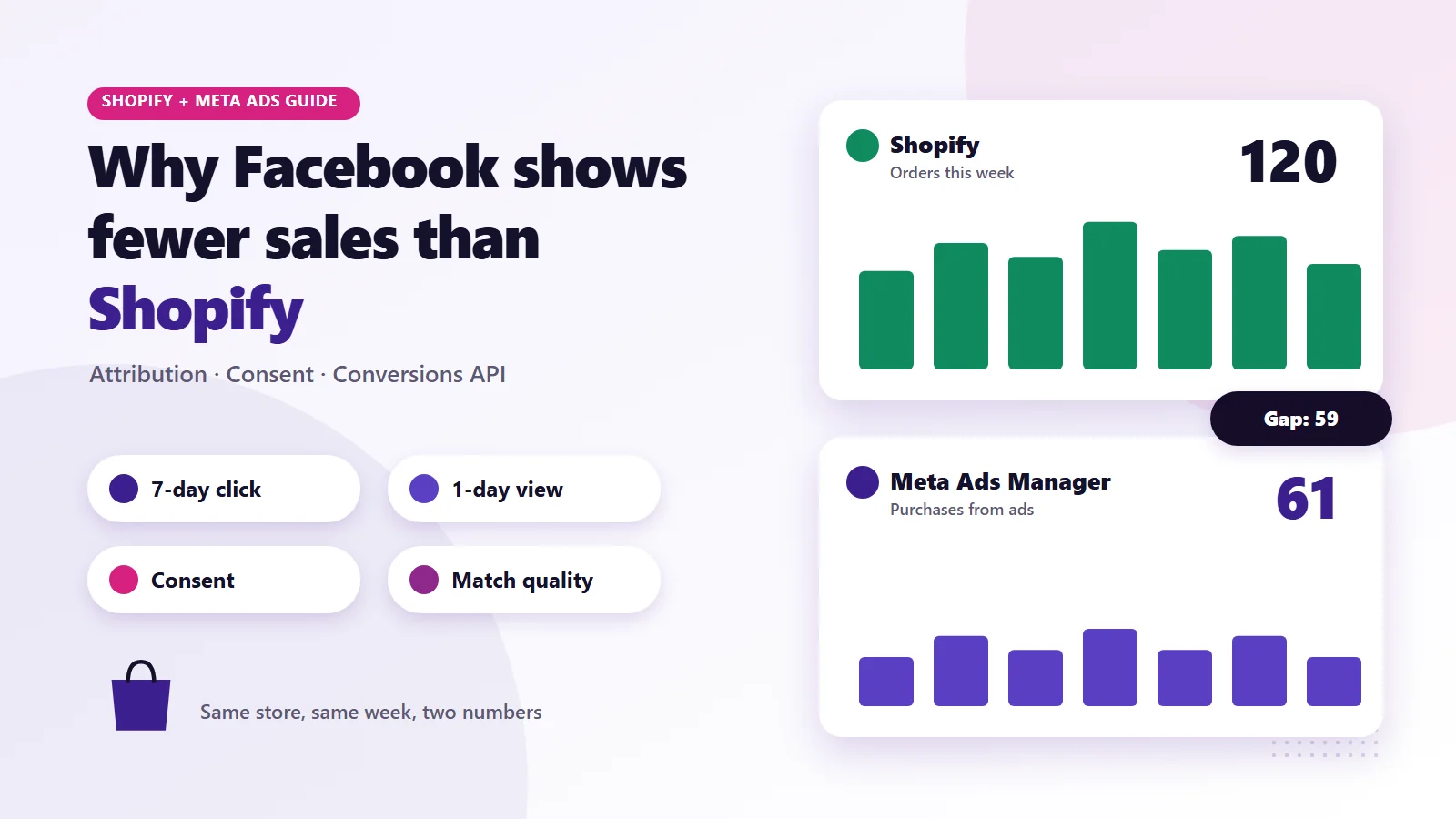
Shopify says 120 orders, Meta says 61. Usually neither is wrong. Here are the official rules each tool counts by, the six reasons for the gap, and a 30-minute check to find yours.
SocialPulse Hub team · Updated 16 Nov 2026 · 10 min read
Key takeaways
- Shopify counts every order. Meta counts only orders from people who clicked an ad in the last 1 or 7 days, or saw one in the last day, so a gap is normal.
- In the UK and EEA, Shopify's pixels run only after a visitor gives consent, so buyers who decline cookies never reach Meta.
- Check your data sharing level in the Facebook & Instagram app. Enhanced and Maximum add the Conversions API, which loses fewer purchases than the pixel alone.
- Meta scores Event Match Quality from 1 to 10 and recommends 6.0 or higher. Trust Shopify for revenue and Meta for comparing ads.
You open Shopify and see 120 orders this week. You open Meta Ads Manager and it says your ads drove 61 purchases. So which one is lying?
Usually neither. Facebook purchases not matching Shopify is one of the most common worries we hear from store owners, and the two tools are answering different questions, using different rules. Shopify counts every order your store takes. Meta counts only the orders it can connect to a person who saw or clicked one of your ads, inside a set time window, and only when it actually received the data. Once you know those rules, most of the gap stops being a mystery, and the part that is a real tracking problem becomes easy to spot and fix.
This guide is for Shopify founders in the US and UK who spend money on Facebook and Instagram ads and want to know which number to trust. Every rule below comes from Meta's or Shopify's own documentation, linked so you can check it yourself.
The rules each tool counts by
Here are the official numbers that decide what each side counts.
| Rule | Meta Ads Manager | Shopify |
|---|---|---|
| Which orders count | Only orders attributed to a person who was shown your ad, after duplicates are removed | Every order, from every channel |
| Click window | 1 day or 7 days after a link click | No click needed |
| View window | 1 day after someone saw the ad without clicking | Not counted |
| Engage window | 1 day after a non-link click, or a 5-second video play | Not counted |
| Who gets credit | Meta credits its own ads | Last non-direct click by default, so the last channel before the order gets 100% of the credit |
| UK and EEA visitors | Only what the pixel was allowed to send | Pixels run only after the visitor gives consent |
Read that table once more and the gap starts to make sense. A customer who saw your ad 10 days ago, then came back through a Google search and bought, is a sale in Shopify and invisible to Meta. That is not broken tracking. It is the Facebook attribution window, here the 7-day click window, doing exactly what it says.

Six reasons Facebook shows fewer sales than Shopify
1. Shopify counts orders that never touched an ad
Returning customers, email and SMS buyers, Google shoppers, people who typed your address in: all of them appear in Shopify. None of them will appear in Meta unless they also clicked or saw a Meta ad inside the window. For an established store, this alone often explains a big share of the difference.
2. Visitors in the UK and EEA who decline cookies
Shopify's help centre says that in markets set to require consent, usually the European Economic Area and the United Kingdom, web pixels run only when visitors have given the permissions the pixel needs. Someone who taps "decline" can still buy, so Shopify records the order, but the Meta pixel never fires for them. If a large share of your buyers are in the UK, expect a wider gap than a US-only store.
3. Browsers and ad blockers stop the pixel
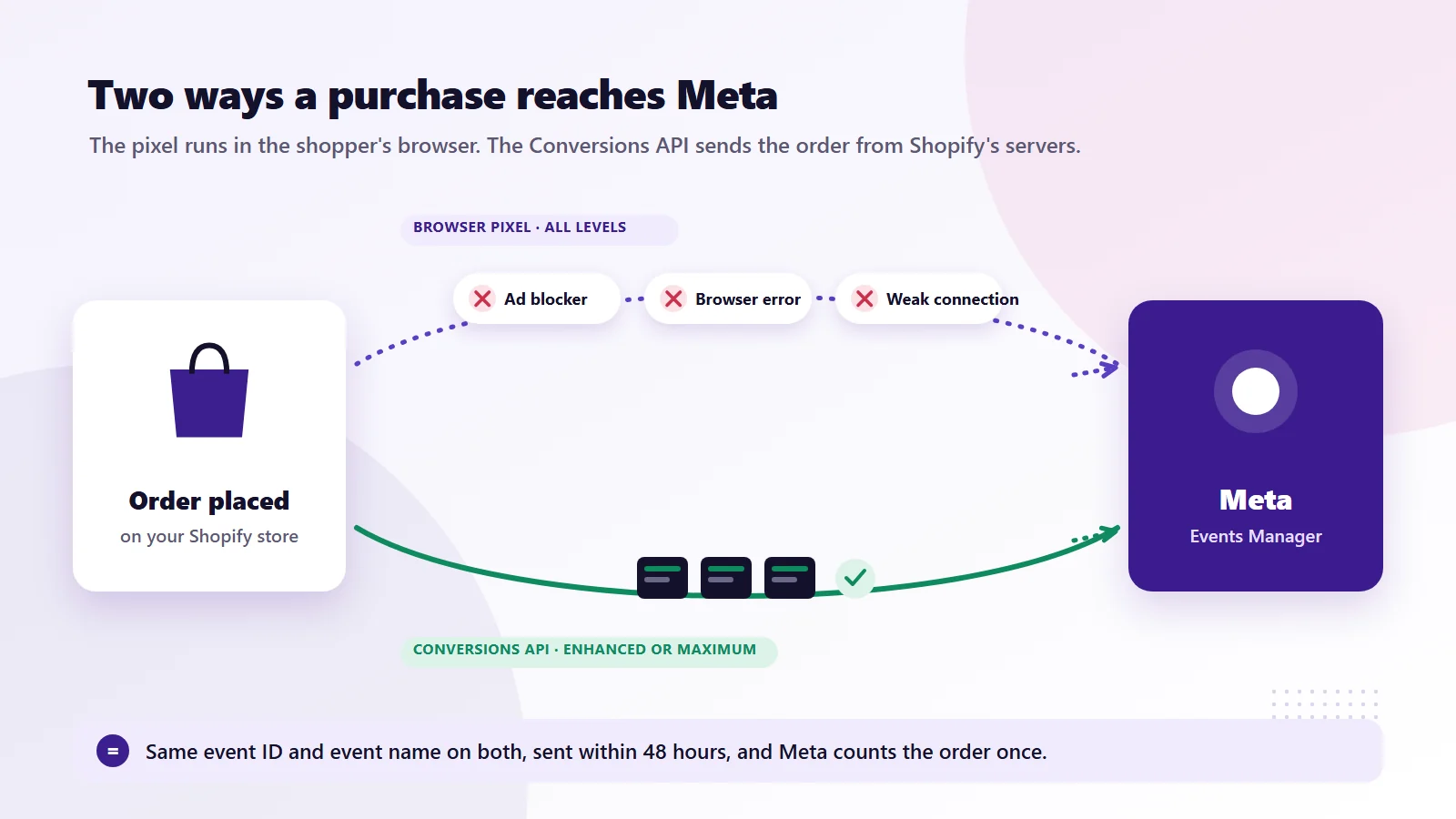
The Meta pixel runs in the shopper's browser. Meta's own Conversions API page says the server connection is less affected than the pixel by "browser loading errors, connectivity issues and ad blockers". In other words, a pixel-only setup loses some purchases before Meta ever hears about them.
4. Your store is still on Standard data sharing
This is one of the most common fixable causes, and it comes down to your Shopify Facebook data sharing setting. In the Facebook and Instagram app, Shopify offers three customer data sharing levels:
- Standard: the Meta pixel only, running in the browser
- Enhanced: the pixel plus Meta's Conversions API, which sends the purchase from Shopify's servers to Meta's
- Maximum: the pixel and Conversions API, plus Meta's latest advertising features
If you are on Standard, you are relying on the Meta pixel Shopify installs in the browser alone, and every purchase lost to a blocked or failed pixel is simply gone. Switching to Enhanced or Maximum turns on the Conversions API for Shopify stores, sent from Shopify's own servers. Shopify handles the connection, so there is no code to write. You can check it in your admin under Sales channels > Facebook & Instagram > Settings > Data sharing settings.
5. Meta cannot match the purchase to a person
Even when Meta receives a purchase, it can only credit an ad if it can match that purchase to the person who saw it. Meta measures this as Event Match Quality, scored from 1 to 10, and recommends aiming for 6.0 or higher where possible. A low score usually means the purchase event is missing details such as email or phone number, so fewer orders can be tied back to an ad.
6. Duplicate and late events
When the pixel and the Conversions API both send the same purchase, Meta needs to know they are one order, not two. It matches them using the same event ID and event name, and only within 48 hours of the first copy arriving. Get the IDs wrong and you either double count or lose real orders.
Timing matters too. A server event can be dated up to 7 days in the past. Anything older is rejected, and Meta will reject the whole batch it came in, not just that one event. Meta's Conversions API best practices ask you to send events in real time or as close to it as possible.
And why Facebook sometimes shows more
Some founders see the opposite: Meta claims more sales than seem possible. Two rules explain most of it.
- View-through credit. Meta can count a purchase made within 1 day of someone seeing your ad, even if they never clicked. Shopify would give that order to whatever channel they used to arrive.
- Every platform claims the same sale. Shopify gives each order to one channel. Meta, Google and your email tool each use their own rules, so the same order can appear in all three. Add up every platform's "purchases" and you will often get more than your real total.
How to check your own numbers in 30 minutes
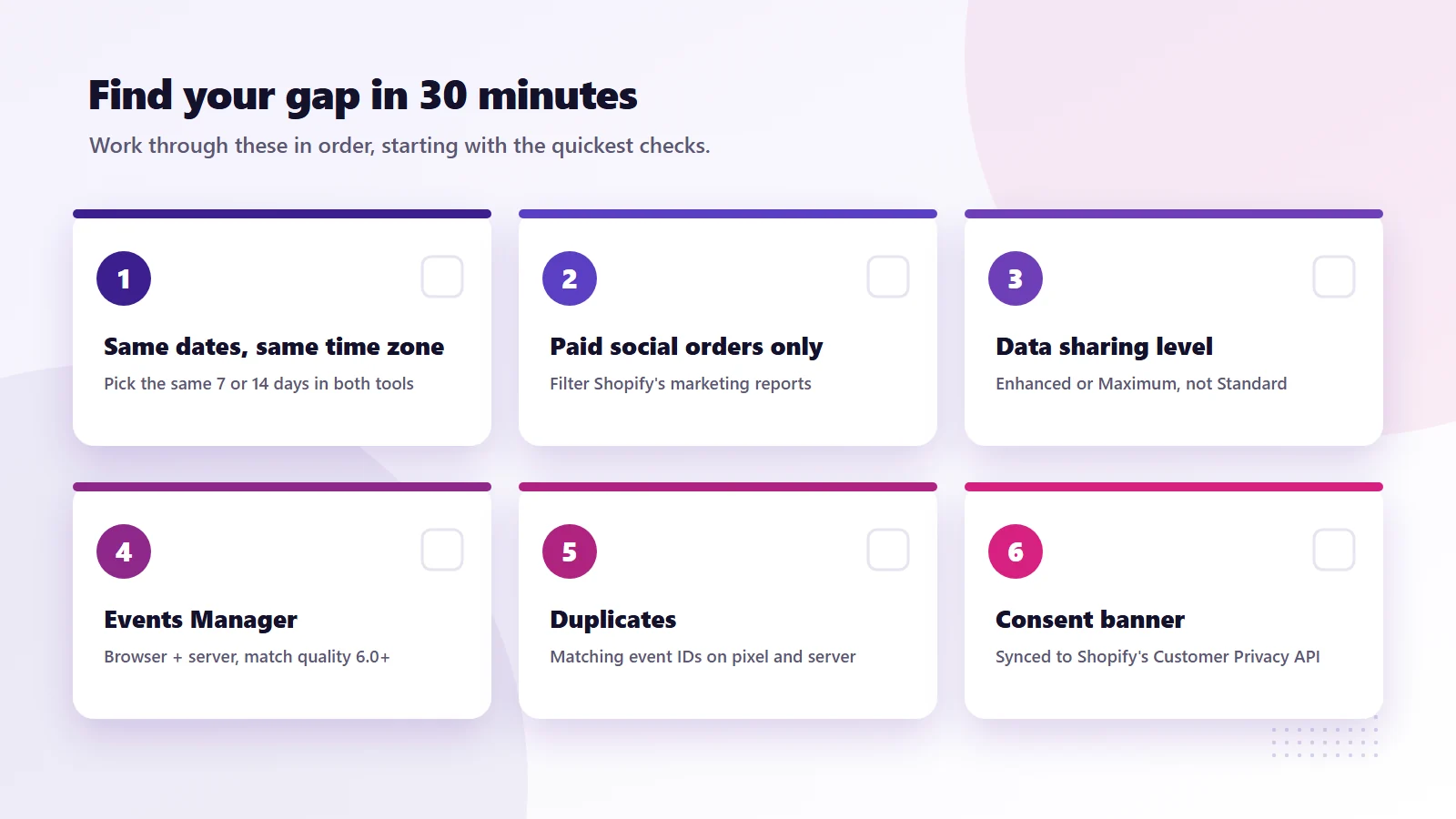
You do not need a tracking specialist to find out where your gap comes from. Work through these in order.
- Match the date range and time zone. Pick the same 7 or 14 days in both tools. If your ad account and your store use different time zones, orders near midnight will land on different days.
- Count only paid social orders in Shopify. Open your marketing reports and filter to Facebook and Instagram paid traffic. Comparing Meta's purchases to your total orders is the most common mistake.
- Check your data sharing level. If it says Standard, move to Enhanced or Maximum, and make sure your privacy policy explains how you share data.
- Open Events Manager. Look at your Purchase event. Check that it receives events from both the browser and the server, and that the Event Match Quality score is 6.0 or higher.
- Look for duplicates. If Meta shows more purchases than Shopify recorded on the same day, check the deduplication section in Events Manager for both sources sending matching event IDs.
- Check your consent banner. If you use a third-party cookie app, Shopify says it must sync consent to Shopify through the Customer Privacy API, or your pixels might not fire even after a visitor accepts.
Which number should you trust?
Use Shopify for the truth about money in the bank. It records every order and every refund. Use Meta to compare ads and audiences against each other, because its numbers are consistent with themselves even when they do not match Shopify.
For the bigger decision, "is Facebook worth what I spend?", look at both together over a few weeks:
| What to track weekly | Where it comes from |
|---|---|
| Total sales | Shopify |
| Total ad spend, all platforms | Each ad account |
| Total sales divided by total ad spend | Your own sheet |
| Meta purchases and cost per purchase | Ads Manager |
| Paid social orders | Shopify marketing reports |
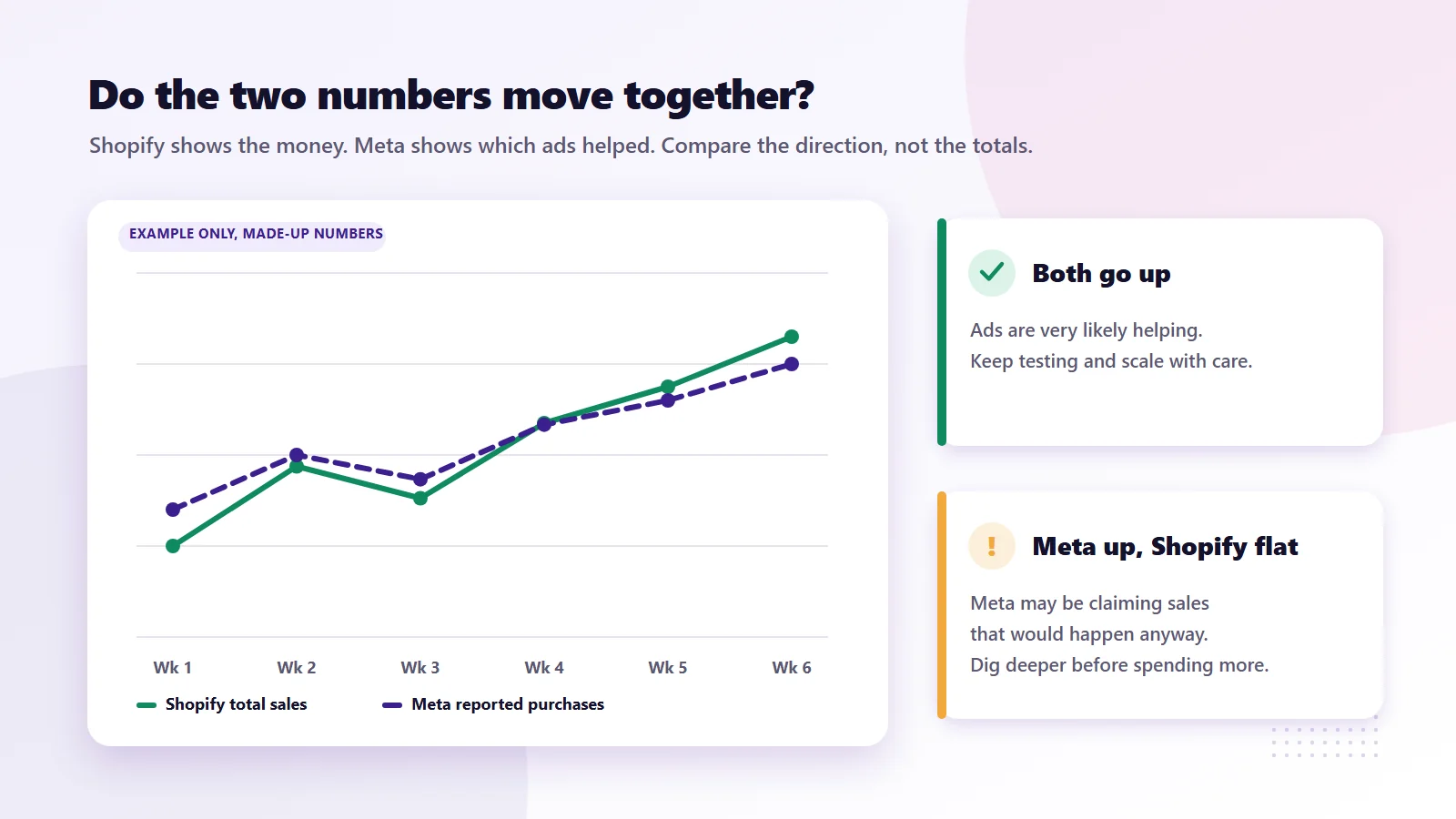
Here is a simple example, with made-up numbers purely to show how the comparison works:
| Example only | Week 1 | Week 2 |
|---|---|---|
| Shopify total sales | $24,000 | $27,500 |
| Total ad spend | $6,000 | $6,500 |
| Sales per $1 of ad spend | $4.00 | $4.23 |
| Meta reported purchases | 61 | 70 |
The question is not whether the Meta column matches Shopify. It is whether both move in the same direction when you change your ads. If Meta reports more purchases and your total sales rise too, the ads are very likely contributing. If Meta reports more and Shopify stays flat, dig deeper before spending more.
Meta also offers an incremental attribution model in Ads Manager, which, in Meta's words, uses models that predict whether a conversion is caused by an ad. It is worth testing alongside standard attribution if you are spending enough to make the comparison meaningful.
Common mistakes
- Comparing Meta purchases to all Shopify orders. Compare like with like: paid social orders against Meta purchases.
- Installing a second pixel by hand. Adding the pixel code to your theme while the Shopify app also sends it is a common cause of double counting.
- Leaving data sharing on Standard. It is a two-minute settings change.
- Turning off ads because of one bad week in Ads Manager. Check the trend in Shopify first.
- Ignoring consent rules to "get the data back". Shopify warns that code used to bypass customer consent violates its terms of service and can lead to legal liability. Fix the setup properly instead.
- Treating Facebook ads not tracking Shopify sales as an ad problem. Before you rewrite campaigns, rule out tracking. A well-run campaign judged on broken data looks like a bad campaign.
How we approach this
When we take on a Shopify store's Meta ads, tracking is the first thing we check, before we touch a single campaign. Most of the time the fixes are small: the right data sharing level, one pixel instead of two, a consent banner that talks to Shopify properly. What changes is that every decision after that is made on numbers you can trust. Results still depend on your products, prices, offer and site, so we treat tracking as the foundation, not a promise of sales.
If you want a second pair of eyes on your setup, see how we run Meta Ads for online stores and Shopify website work, or request a free audit and report using the button below. If AI shopping is also on your list, our guide on getting your Shopify products recommended by ChatGPT covers the product data side.
Frequently asked questions
Why are my Facebook purchases not matching Shopify?
Mostly because the two tools count different things. Shopify records every order. Meta Ads Manager only counts purchases it can attribute to someone who was shown your ad, within its attribution setting of 1 or 7 days after a click or 1 day after a view. Consent rules, ad blockers, your data sharing level and match quality widen the gap further.
What is the Facebook attribution window?
Meta's standard attribution settings count website purchases within 1 day or 7 days after a link click, within 1 day after someone saw the ad without clicking, and within 1 day after a non-link engagement such as a 5-second video play. You choose the setting at the ad set level in Ads Manager.
Which Shopify data sharing level should I use for Facebook?
Shopify offers Standard, Enhanced and Maximum in the Facebook & Instagram app. Standard uses the Meta pixel only. Enhanced and Maximum also use Meta's Conversions API, which sends purchases from Shopify's servers. You can change it under Sales channels, Facebook & Instagram, Settings, Data sharing settings.
What is a good Event Match Quality score?
Meta scores Event Match Quality from 1 to 10 in Events Manager and recommends aiming for 6.0 or higher where possible. Sending customer details such as email and phone number with purchase events usually improves it.
Why does Facebook sometimes show more sales than Shopify?
Meta can credit a purchase made within 1 day of someone seeing your ad, even without a click, and each ad platform uses its own rules. The same order can be claimed by Meta, Google and your email tool, while Shopify gives it to one channel only. Duplicate pixel events can also inflate Meta's count.
Do cookie banners affect Facebook tracking on Shopify?
Yes. In markets set to require consent, usually the EEA and UK, Shopify runs web pixels only after the visitor gives the required permissions. If you use a third-party cookie app, it must sync consent to Shopify through the Customer Privacy API, or pixels might not fire even after a visitor accepts.
Which number should I trust, Shopify or Meta?
Use Shopify for revenue, because it records every order and refund. Use Meta to compare campaigns, ads and audiences against each other. To judge whether ads are working overall, track total sales against total ad spend each week and watch whether Shopify and Meta move in the same direction.
Have a question about this guide or your own setup? Contact us and our team will get back to you.